Skip to content
Schedule A Demo
Our Modules
Vertex System
Billing Manager
Case Manager
EVV Manager
Workforcehub Advanced
Vertex Financial Manager
Client Payroll Manager
About Us
Who We Serve
The Arc’s
Blind & Visually Impaired Organizations
Goodwill Organizations
14(c) Employers & Agencies
Partners and Integrations
Contact Us
Resources
Case Studies
Blog
Infographics/Whitepapers
Product Brochures
Support
Learning Center
Our Modules
Vertex System
Billing Manager
Case Manager
EVV Manager
Workforcehub Advanced
Vertex Financial Manager
Client Payroll Manager
About Us
Who We Serve
The Arc’s
Blind & Visually Impaired Organizations
Goodwill Organizations
14(c) Employers & Agencies
Partners and Integrations
Contact Us
Resources
Case Studies
Blog
Infographics/Whitepapers
Product Brochures
Support
Learning Center
Home
»
Knowledge Base
»
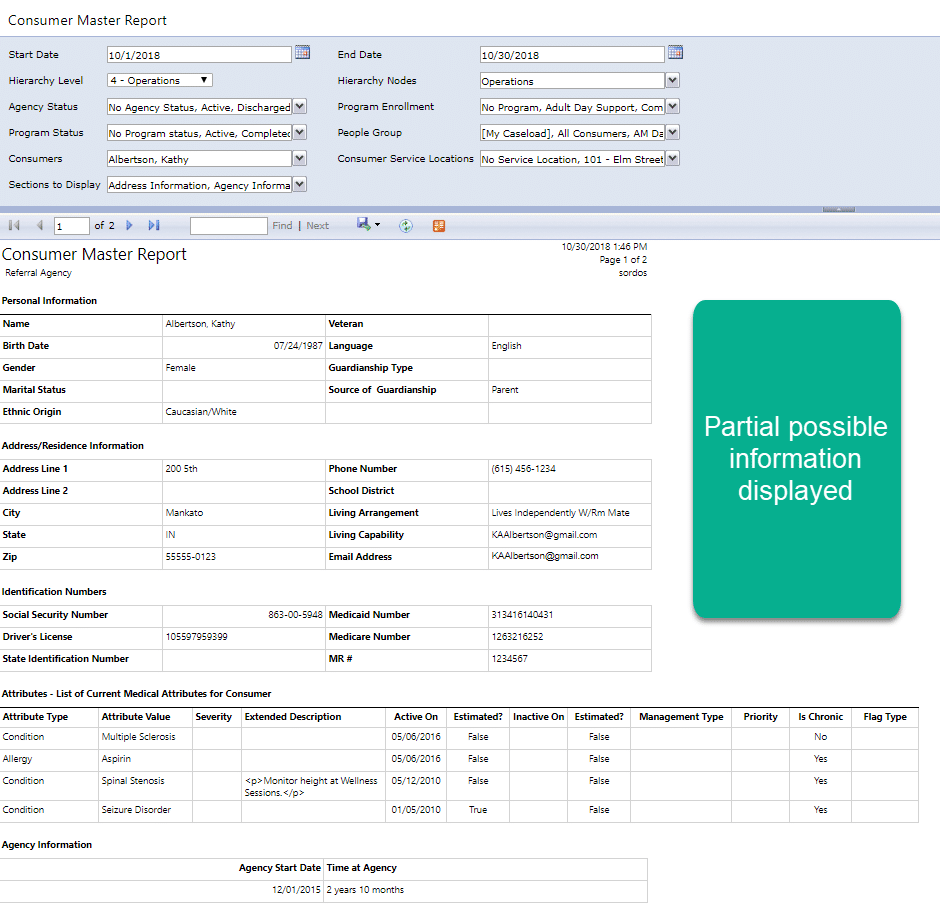
Using the Consumer Master Report in Case Manager
Using the Consumer Master Report in Case Manager
Be sure to click the down-arrow to the right of Section to Display to see the options. You can select as many as you’d like.
Prev
Previous
Out of Memory error message in Case Manager
Next
Billing Manager – Billing Process Checklist
Next
Related Guides
Using the Vertex Time Clock | Training Video
View Guide
Using Vertex Touch | Training Video
View Guide
Vertex Service Billing | Training Video
View Guide
Vertex Case Management Multi-Consumer Service Entry | Training Video
View Guide
Scroll to Top
Skip to content
Open toolbar
Accessibility Tools
Accessibility Tools
Increase Text
Increase Text
Decrease Text
Decrease Text
Grayscale
Grayscale
High Contrast
High Contrast
Negative Contrast
Negative Contrast
Light Background
Light Background
Links Underline
Links Underline
Readable Font
Readable Font
Reset
Reset